
Best for invoice-led international collection: Zeam. Best for recurring billing: subscription billing software. Best for customer checkout: a card processor. Best for outsourced transaction administration: a merchant of record. This 2026 guide separates collecting money from managing subscriptions, so you choose the right tool rather than expecting one account to do everything.
- Zeam suits invoice-led USD and EUR collection; confirm business verification and payment-route approval before sharing receiving details.
- Choose cross border payment tools for african saas companies by collection method, subscription billing and supplier-payment needs.
- Card processing, subscription billing and merchant-of-record services solve different problems; compare responsibilities, not just payment methods.
- South African tour operators should separate overseas booking deposits, balance payments and local supplier commitments.
Why this matters
An overseas customer agreeing to pay does not settle how you will collect, reconcile or spend the money. A SaaS business needs to connect receipts to customer accounts; a South African safari operator needs to connect booking deposits to accommodation, transport and guide commitments.
Both businesses face the same practical decision: do you need receiving details for customer payments, a checkout, recurring billing, or a provider that takes on the seller role? These are different requirements. Your 2026 shortlist should start there, not with a provider logo.
Zeam supports international collection and business-money management. It is not a bank, and its digital balances are not bank deposits. Do not treat receiving details as evidence of deposit protection or assume they include subscription-management functionality.
What makes the best cross-border payment tools?
Use these criteria before choosing a payment tool. A product belongs on your shortlist only when its actual service matches the way your customers pay.
- Collection method: Decide whether customers need business receiving details, card checkout or recurring charges.
- Billing responsibility: Identify who creates invoices, manages renewals and handles failed subscription collections.
- Currency handling: Check the currencies you can receive, hold, convert and use for outgoing payments.
- Eligibility and approval: Confirm business eligibility, verification requirements and the specific payment route before relying on it.
- Records and controls: Check payment references, accounting requirements, access permissions and approval processes.
- Contractual responsibility: Establish who handles refunds, disputes, transaction taxes and customer payment support.
For a 2026 decision, write down your required workflow before requesting product confirmation. “Receive EUR against an invoice and pay a South African supplier” is a useful requirement. “Accept international payments” leaves too much unresolved.
Cross-border payment options at a glance
The ranking below is a decision tree, not a claim that every business needs the first option. A receiving account does not replace a checkout, and a checkout does not automatically manage your subscription lifecycle.
| Rank and option | Best for | Standout role | Key limitation |
|---|---|---|---|
| 1. Zeam | Invoice-led USD and EUR collection | Receiving details in the business’s name, multiple currency balances and business payments | Subscription billing and card acceptance must be assessed separately |
| 2. Subscription billing software | Managing recurring customer charges | Subscription schedules and billing administration | Billing software alone does not establish your collection or settlement route |
| 3. Card processor | Customer-facing card checkout | Accepting card payments through a checkout | Card acceptance alone does not cover your entire billing or treasury workflow |
| 4. Merchant of record | Outsourcing the seller-of-record role | Provider acts as the seller for covered transactions | Responsibilities and control depend on the contract |
1. Zeam: best for invoice-led international collection
Best for: African businesses collecting USD and EUR from US and European clients against invoices, subject to approval and route confirmation.
Zeam provides receiving details in your business’s name, multiple currency balances and conversion when needed. It also supports local supplier payments, payment links, records, accounting integrations and team approvals; international and bulk payments sit on higher plans.
For SaaS, this fits a workflow where a business customer pays an agreed invoice rather than entering a card for automatic renewal. For a South African tour operator, the comparable workflow is receiving an overseas booking deposit and tracking it against the guest’s booking.
Pros:
- Receive USD and EUR using receiving details in your business’s name.
- Hold multiple currency balances and convert when your business needs to.
- Connect incoming-money administration with supplier payments and team controls.
Cons:
- Receiving details are not evidence of automatic subscription charging or a replacement for card acceptance.
- Higher-plan requirements apply to international and bulk payments; confirm approval and route conditions before committing.
Before directing a customer to pay, apply for a business account and complete verification. Confirm that the intended customer payment and subsequent supplier payout fit the approved setup.
Verdict: Choose for invoice-led collection and business-money management; assess subscription billing separately.
2. Subscription billing software: best for recurring billing
Best for: SaaS companies whose main problem is managing subscriptions, renewals and billing changes.
Subscription billing software manages the billing relationship over time. Depending on the product, that includes subscription schedules, invoices, renewal administration and handling failed collection attempts; check the actual feature set before choosing.
This category belongs ahead of a new receiving account when your operational problem is knowing who should be billed, when and for what. You still need to establish how the software collects payments and where the proceeds settle.
Pros:
- Organises recurring billing around customer subscriptions.
- Separates billing schedules from manual reminders and spreadsheets.
- Provides a defined place to manage subscription-related records.
Cons:
- A billing product does not by itself establish eligibility for a payment processor or receiving account.
- Features such as automated retries, tax handling and accounting connections require product-specific confirmation.
Ask for a demonstration of a customer upgrading, failing a payment and cancelling. Those events reveal more about fit than a demonstration of a successful first invoice.
Verdict: Choose when recurring-billing administration is the problem; confirm the collection route independently.
3. Card processor: best for customer-facing checkout
Best for: Businesses that need customers to enter card details and complete a payment through checkout.
A card processor supports card-payment acceptance. A payment link is a way to direct a customer to a payment page; the link itself does not tell you which payment methods, currencies or settlement arrangements are supported.
For a SaaS company selling through self-service checkout, card acceptance is a different requirement from receiving an enterprise invoice payment. For a safari business, a guest paying a booking deposit by card also follows a different process from a guest paying against receiving details.
Pros:
- Supports a customer-facing card-payment journey.
- Fits checkout-led sales rather than requiring every customer to follow invoice-payment instructions.
- Can sit alongside an invoice-led collection process for customers with different preferences.
Cons:
- Card transactions require procedures for refunds and disputes.
- Supported businesses, currencies, recurring-payment capabilities and settlement destinations need provider-specific confirmation.
Keep the checkout decision separate from the billing decision. A card payment succeeding does not prove that renewals, subscription changes or accounting reconciliation work correctly.
Verdict: Choose when customers need card checkout; keep a separate checklist for recurring billing and settlement.
4. Merchant of record: best for outsourcing the seller role
Best for: SaaS businesses that want a provider to act as seller of record for covered customer transactions.
A merchant of record sells to the customer under the arrangement defined in its contract. That role differs from simply processing a payment: the agreement determines responsibilities for transaction administration, applicable taxes, refunds and customer-facing payment terms.
Choose this model because you want that allocation of responsibility, not because it sounds like another receiving account. Check whether the provider accepts your business and product before redesigning your checkout around it.
Pros:
- Establishes a defined seller-of-record arrangement for covered transactions.
- Places specified transaction responsibilities with the provider under the contract.
- Gives you one contractual framework to assess for checkout, transaction administration and payouts.
Cons:
- You must work within the provider’s product rules and contractual terms.
- Customer experience, payout arrangements and responsibility boundaries require close review.
Read the agreement alongside your customer terms. Identify who appears as seller, who approves refunds and what happens when the commercial relationship ends.
Verdict: Choose when outsourcing the seller role is deliberate; skip when you only need receiving details.
Build the payment workflow before choosing the tool
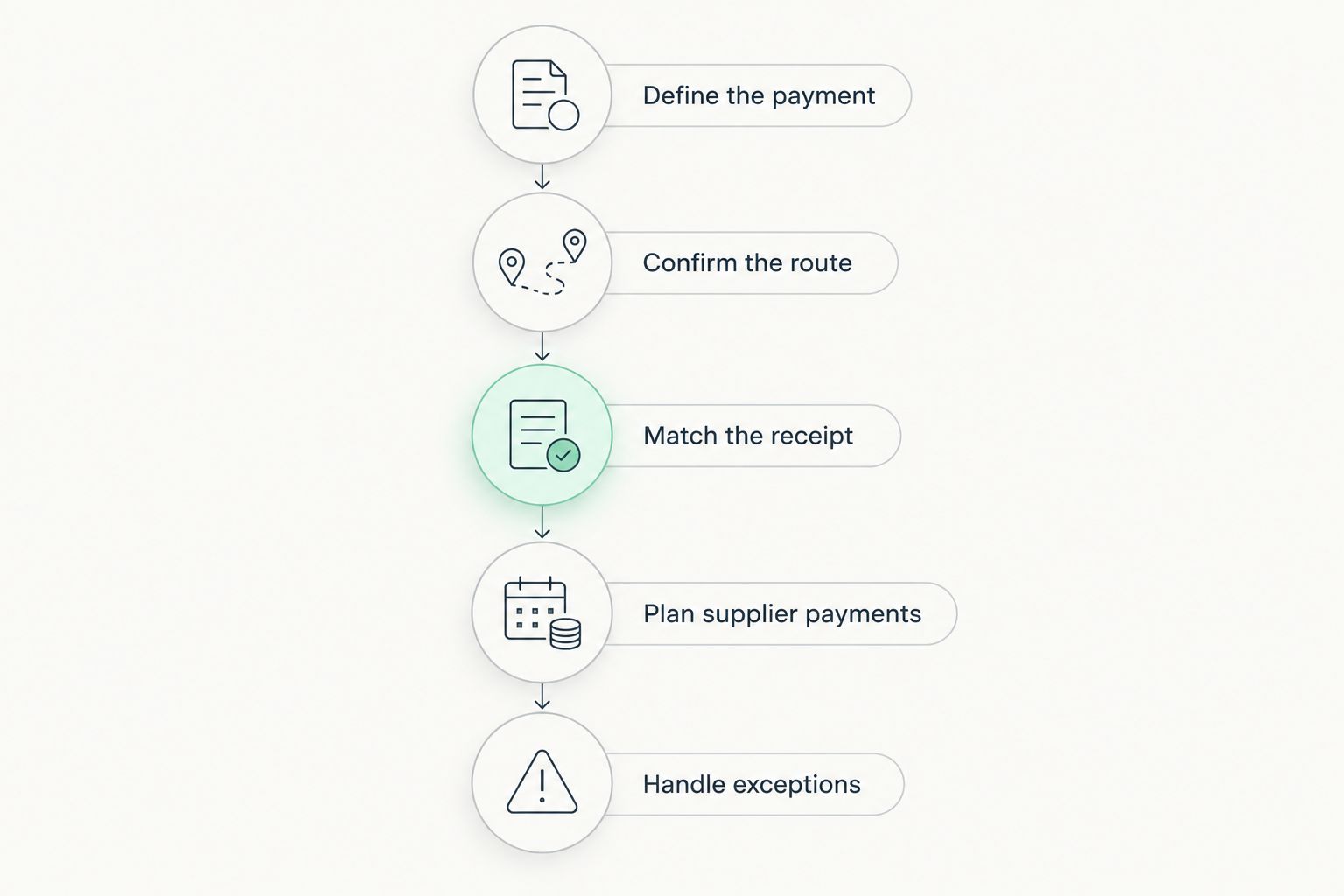
Use these 5 steps to connect your customer-facing promise with your actual collection and supplier-payment process. Complete the exercise for each payment method rather than assuming every route works alike.
Define the payment
Write down what the customer owes, the invoice currency and the payment milestone. For SaaS, distinguish an annual invoice from a recurring subscription; for tourism, distinguish the deposit from the booking balance.
Confirm the route
Check the payment method, receiving currency, sender instructions and approved destination. Complete business verification before issuing live payment instructions, and do not promise a transfer time that has not been confirmed.
Match the receipt
Choose a reference that connects the payment to the customer, invoice or booking. Record what happens when the sender omits the reference or pays an amount that does not match the expected balance.
Plan supplier payments
Identify the currency and due date of each outgoing commitment. Receiving EUR does not remove the need to plan local supplier payments or decide when to convert.
Handle exceptions
Document refunds, disputed payments, incorrect references and cancelled bookings or subscriptions. Assign responsibility before a customer needs help, including who approves an outgoing refund.
For your 2026 setup, test the records as carefully as the payment itself. A receipt without a clear customer reference still leaves your team with work to resolve before confirming a booking or updating an account.
Start your business account application
Apply, complete verification and confirm the payment route before sharing receiving details with customers.
South African tourism: deposits are not the whole booking
A tour operator or safari business should map 3 payment milestones: the booking deposit, the remaining guest balance and the supplier payment. These are separate records, even when they relate to the same trip.
Suppose a European guest is invoiced in EUR while local accommodation and transport commitments are payable in rand. Record the guest’s payment against the booking, then plan conversion and supplier payments against their actual due dates. Do not treat the foreign-currency balance as a completed local payout.
Offer receiving instructions and card-payment options according to the routes you have actually confirmed. A payment link needs clear instructions about what the guest is paying for; it does not replace your booking record, cancellation terms or balance reminder.
Keep 2 collection paths distinct: invoice-led payments and card checkout. Reconcile both against the same booking record, and tell your team which evidence is required before confirming receipt.
How the options are ranked
This ranking matches each category to a distinct job: invoice-led collection, recurring billing, card checkout or the seller-of-record role. It does not award an overall winner based on unsupported performance or savings claims.
Use the criteria above to eliminate poor fits. If recurring billing is mandatory, a receiving account alone is incomplete; if overseas invoice collection is the requirement, start by confirming the receiving route rather than adding unnecessary checkout administration.
Which cross-border payment tool should you choose?
Zeam is best for invoice-led USD and EUR collection by African businesses that also need business-money management. Apply and complete verification, then confirm the intended collection and payout routes before giving customers payment instructions.
Choose subscription billing software when renewals are the central problem. Choose a card processor when checkout is essential, or assess a merchant of record when you deliberately want a provider to take the seller role. Your 2026 decision should follow the required workflow, not the length of a feature list.
FAQ
What's the best cross-border payment tool for an African SaaS company?
The best option depends on whether you need invoice collection, recurring billing, card checkout or a merchant-of-record arrangement. Choose the category first, then confirm business eligibility, verification and the payment route.
Can Zeam receive USD and EUR from overseas clients?
Zeam supports receiving USD and EUR from US and European clients using receiving details in the business’s name. Apply, complete verification and confirm the intended route before sharing payment instructions.
Does a receiving account replace subscription billing software?
No. Receiving money and managing subscription schedules are separate jobs; confirm how invoices, renewals, failed collections and customer records will be handled.
Are payment links the same as card processing?
No. A payment link directs a customer to a payment page, while card processing handles card-payment acceptance. Confirm the payment methods and settlement arrangements behind the link.
How should a South African safari operator collect overseas deposits?
Use a confirmed payment route and connect every receipt to the booking record. Track the deposit, remaining guest balance and local supplier commitments separately, whether the guest pays against receiving details or through card checkout.
Are digital balances the same as bank deposits?
No. Digital balances should not be described as bank deposits, and receiving details do not establish deposit protection. Check the provider’s legal terms and the nature of the balance you hold.
What should I check before switching payment tools in 2026?
Check business eligibility, verification, collection methods, currencies, reconciliation and outgoing-payment requirements. Also establish who handles refunds, disputes and customer payment support before changing live instructions.
One last thing
Design the payment reference before sending the invoice. A consistent customer or booking reference connects the incoming payment, the remaining balance and the supplier commitment. That operational detail belongs in your payment instructions, not in a spreadsheet repair exercise afterwards.