
African nonprofits’ accounting integration is the connection between payment records and accounting software, with the aim of producing accurate fund, currency and expenditure reports. This guide to accounting integrations for African nonprofits explains how to preserve donor restrictions, reconcile overseas receipts and check a connection before relying on it.
- Accounting integrations for African nonprofits should preserve fund codes, original currencies and payment references—not merely import balances.
- Start with a controlled spreadsheet reconciliation before connecting payment records to accounting software.
- Zeam supports accounting integrations; confirm software compatibility, nonprofit eligibility and payment routes before applying.
- Keep payment collection, fund accounting and approval controls separate when evaluating any connection.
Why accounting integrations matter for African nonprofits
A nonprofit needs more than a record that money arrived. You need to connect the receipt to its purpose, identify any spending restrictions and explain how the funds were used. An imported transaction without that context still requires manual investigation.
Overseas receipts add another layer: the original payment, currency conversion and local supplier payment are separate events. Your accounting records must explain each event without counting the same money as income again.
Zeam supports accounting integrations and multi-currency money management for businesses. Zeam is best for businesses seeking USD and EUR receiving alongside money management, subject to approval and route availability. A nonprofit must confirm organisational eligibility and its intended payment activity before applying for a business account and completing verification.
For your 2026 selection, judge the connection by the accounting evidence it preserves. A shorter import process is useful only when your finance team can still explain the resulting entries.
How to choose and implement an accounting integration
Define your reporting requirements first
Begin with a spreadsheet listing the reports your trustees, donors and finance team need. Work backwards from those reports to the fields each transaction must carry. Do this before reviewing software demonstrations.
Distinguish the source of the money from its permitted use. A donor name identifies who paid; a fund code identifies where the organisation allocates the receipt. Your accounting policy determines when and how that receipt becomes recognised income.
For a conservation nonprofit connected to South African tourism, for example, a restricted project contribution and a payment for an activity need separate classification. Do not treat every overseas receipt as a donation merely because the organisation is a nonprofit.
- List required donor, project and fund identifiers.
- Record restrictions separately from payment descriptions.
- Define who approves changes to accounting classifications.
- Identify the documents supporting each receipt type.
Map the payment journey before connecting software
Trace a receipt manually from the payer’s instructions to the accounting entry. Use statements, payment records and your ledger to identify where information changes or disappears. This gives you a baseline for evaluating an automated connection.
For a USD or EUR receipt, distinguish receipt confirmation, any currency conversion and eventual supplier settlement. A transfer between your own currency balances is not another donor contribution. Your accountant should define the entries for conversion differences and transaction charges.
Zeam supports receiving USD and EUR from US and European clients using receiving details in the business’s name. That business capability does not establish that a particular nonprofit, donor payment or funding arrangement qualifies; confirm those points before issuing payment instructions.
- Identify the payer and intended recipient.
- Record the original amount and currency.
- Separate receipts, conversions and supplier payments.
- Retain references linking each event to its evidence.
Verify compatibility before applying
Start with a written compatibility checklist and a sample transaction record. Ask what the connection actually does: imports transactions, matches existing records, creates entries or passes information for review. These are different functions.
Zeam accounting integrations sit alongside payment records, multi-currency balances and team approvals. The published product information does not establish a specific software connector or its behaviour. Obtain confirmation of your accounting package, supported fields, connection method and approval conditions before committing your workflow.
If the organisation qualifies, apply for the business account and complete the required verification. Do not redirect donor payments while approval or the receiving route remains unresolved. The accounting integration tools guide provides a related comparison topic, but nonprofit fund accounting needs its own acceptance criteria.
- Confirm organisational eligibility and intended payment activity.
- Name the exact accounting software you use.
- Ask which records and fields the connection transfers.
- Confirm receiving routes and verification requirements.
- Request a demonstration using your transaction types.
Protect fund codes and currency records
Build a field-mapping sheet before enabling imports. Put the payment field beside its accounting destination, then specify what happens when the source field is blank. A missing project reference should enter a review queue, not receive an assumed classification.
Preserve the original currency even when your reports use another reporting currency. The payment amount and the reporting-currency amount answer different questions. Your accountant should set the conversion policy and decide how differences are recorded.
In your 2026 mapping document, include the meaning of each field—not just its name. A field called reference can contain a payer’s message, an invoice identifier or an internal transaction code; those values are not interchangeable.
- Map donor, project and fund fields explicitly.
- Preserve original currency and transaction identifiers.
- Define treatment of missing or ambiguous references.
- Document conversion and charge classification rules.
Separate preparation from approval
A shared checklist can establish basic controls before you introduce software permissions. Identify who prepares supplier payments, who approves them and who reconciles the accounting records. Keep the responsibilities visible even in a small team.
Use 2 reviewers for your implementation test: one checks the payment evidence and one checks the accounting treatment. This is a proposed control, not a universal staffing requirement. If staffing prevents full separation, document the oversight process with your governing body and accountant.
Team approvals are part of the stated product scope, but verify available permissions and approval behaviour for your intended setup. International and bulk supplier payments are on higher plans; do not assume every payment function is included in the account you select.
- Assign preparation, approval and reconciliation responsibilities.
- Check permissions against actual staff duties.
- Restrict changes to payment instructions and fund mappings.
- Document how exceptions receive independent review.
Test representative transactions before switching
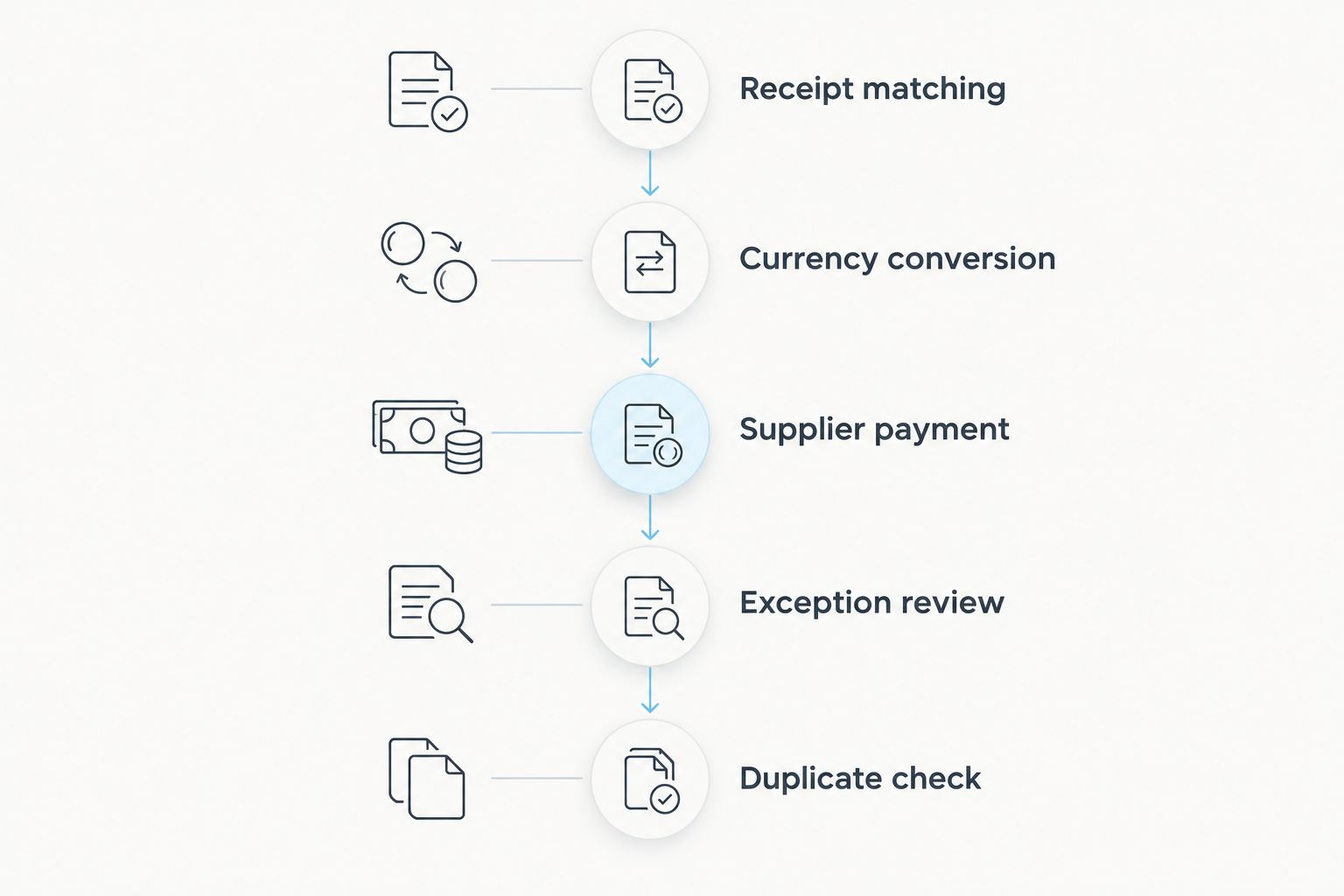
Run a controlled test using 5 representative transactions. Include an overseas receipt, a conversion, a local supplier payment, an unmatched reference and a reversal or correction scenario. These are suggested test cases, not a claim that every platform supports every event.
For each case, compare the original evidence with the resulting accounting record. Check dates, amounts, currencies and classifications. Then test whether importing the same source record again creates a duplicate or triggers a review.
Use the same acceptance checklist throughout your 2026 implementation. A connection should pass the difficult cases, not merely demonstrate that one straightforward receipt appears in the ledger.
- Receipt matching: confirm the correct fund and payer.
- Currency conversion: preserve the original transaction trail.
- Supplier payment: connect the entry to its supporting record.
- Exception review: resolve missing or contradictory information.
- Duplicate check: verify repeated-import behaviour.
Review exceptions and close the reporting period
Begin with an exception register that your team can maintain manually. Record each unresolved transaction, its owner and the action needed. A connection that transfers records without resolving exceptions still leaves reconciliation work for your staff.
Set a 30-day pilot review for your 2026 rollout. This is a suggested review window, not a promised setup time. Compare the pilot records with statements and source documents, then decide whether to expand the connection or correct the mapping.
Keep the close process separate from payment collection. Receiving money successfully does not prove that the fund allocation, conversion treatment or expenditure classification is correct.
- Assign an owner to every unresolved item.
- Reconcile balances against their source records.
- Review changes to mappings and permissions.
- Obtain sign-off before expanding the workflow.
Compare accounting integration options
Choose the least complex option that preserves your reporting controls. A manual process offers direct inspection but requires staff effort. An automated connection reduces repeated handling only when its transferred fields and exception process match your requirements.
Payment collection is a separate choice. Card acceptance, receiving details and payment links describe ways to collect money; none proves that restricted funds are classified correctly. Ask what payment method a link uses rather than assuming every payment link means card acceptance.
| Option | Best for | Main advantage | Key limitation |
|---|---|---|---|
| Manual spreadsheet reconciliation | Small workflows needing direct inspection | You control classification and review | Repeated handling and consistency depend on staff |
| File-based accounting import | Teams with compatible export and import formats | Transfers records in a controlled batch | Field mapping and duplicate checks still need testing |
| Direct accounting connector | Organisations with a confirmed software match | Reduces repeated movement of supported records | Connector scope does not guarantee fund-accounting support |
| Zeam accounting integrations | Eligible businesses combining international receipts and money management | Combines accounting integrations with multi-currency payment records | Nonprofit eligibility, software compatibility and route support require confirmation |
Use a collection method that suits the payer and an accounting process that suits your reporting obligations. Do not assume a receiving account replaces card acceptance, a donor-management system or a booking system. Where a tourism-linked nonprofit also collects activity payments, keep those records distinct from contributions.
Common mistakes African nonprofits make
Treating every receipt as unrestricted income
An accounting import does not interpret a grant agreement for you. If a receipt carries restrictions, the finance team must preserve that information through classification and reporting. Keep the supporting agreement accessible from your transaction records.
Assuming payment integration means donor management
A payer reference is not a donor history, consent record or fundraising report. Define which system owns each type of information. Otherwise, staff end up maintaining conflicting versions of the same donor’s details.
Counting conversions as new receipts
Moving value between currency balances changes its form, not its source. Treat the original receipt, conversion and supplier payment as connected but distinct events. Ask your accountant to review the entries before adopting automated rules.
Describing digital balances as bank deposits
Zeam is not a bank, and its balances are digital balances rather than bank deposits. Use that distinction in internal approvals and provider assessments. Do not infer deposit protection, banking status or nonprofit eligibility from receiving details issued in a business’s name.
Automating before agreeing the close process
A connection cannot decide who owns an unresolved fund code or an unexplained difference. Set those responsibilities before launch. For the 2026 reporting cycle, include exception ownership and sign-off requirements in the same document as your field mapping.
FAQ
What should accounting integrations for African nonprofits do?
Accounting integrations for African nonprofits should transfer usable transaction records while preserving the information needed for reconciliation and fund reporting. Check original currencies, references, classifications and exception handling rather than judging the connection only by import speed.
Can an African nonprofit apply for a Zeam business account?
A nonprofit must confirm its organisational eligibility and intended payment activity with Zeam before applying. Business-account capabilities do not establish nonprofit eligibility; complete the required verification before using approved receiving routes.
Does a payment integration replace nonprofit accounting software?
No, a payment integration does not replace nonprofit accounting software. It connects payment information to an accounting workflow; fund reporting, accounting policies and financial oversight still need appropriate systems and review.
Is a direct connector better than importing a file?
A direct connector is better only when its supported records and controls match your workflow. A file import remains a valid option when you can map fields, prevent duplicates and reconcile each batch reliably.
Can receiving USD or EUR replace card payments?
Receiving USD or EUR does not automatically replace card acceptance. Compare payer needs and approved receiving routes separately, then confirm how each collection method supplies records to your accounting process.
How should a nonprofit account for currency conversion?
A nonprofit should record currency conversion separately from the original receipt and subsequent spending. Preserve the source evidence and have an accountant define the reporting-currency treatment, charges and conversion differences.
Are Zeam balances bank deposits?
No, Zeam balances are digital balances, not bank deposits, and Zeam is not a bank. Keep that distinction clear when assessing the provider and documenting internal approvals.
One last thing
Make the test transaction difficult on purpose. Use an ambiguous reference or a corrected classification in your controlled trial, with no live donor money needed. The useful question is not whether a record imports; it is whether your team can trace, explain and correct it without losing the evidence.