
Best for booking-linked payment approvals: Zeam. Best overall for employee expense reports: Zoho Expense. Best for receipt-led submissions: Expensify. Best for corporate travel expenses: SAP Concur Expense. This 2026 guide compares expense approval tools for African finance teams, with practical choices for South African tour operators and safari businesses managing overseas booking income and local supplier costs.
- Zeam suits payment approvals alongside USD and EUR receipts; it is not a dedicated employee expense recommendation.
- Zoho Expense is the default shortlist choice for employee expense reports and reimbursements.
- Expensify suits receipt-led expense submissions; SAP Concur Expense suits corporate travel-expense oversight.
- Choose expense approval tools for African finance teams by workflow, eligibility and accounting requirements—not feature counts.
Why this matters
A safari booking creates different financial decisions. You collect a guest’s deposit, commit money to accommodation or transport, receive the balance, and pay suppliers. Separately, a guide might submit a receipt for an approved business purchase.
Approving a supplier payment is not the same as approving an employee expense claim. Buying a receipt-management application does not automatically give you the right controls for releasing supplier payments. A business money platform does not automatically replace expense reporting either.
For your 2026 shortlist, separate these jobs before comparing products. That distinction matters more than whether a provider describes itself as an all-in-one finance platform.
What makes the best expense approval tools?
Use these criteria to assess each option before choosing a demo or starting an application:
- Approval purpose: Establish whether you need permission to incur a cost, approval of an expense report, or authorisation to release money.
- Supporting evidence: Check how invoices, receipts, booking references and approval decisions stay connected.
- Role separation: Confirm who can submit, approve and pay. Ask whether the configuration supports the separation your business requires.
- Currency handling: Distinguish recording a foreign-currency expense from receiving, holding, converting or paying currency.
- Accounting handoff: Check your specific accounting system and the information transferred, rather than accepting a generic integration claim.
- Eligibility and controls: Confirm business eligibility, verification, relevant plan requirements and supported payment routes before committing.
For a 2026 review, take a real booking through the demonstration: an overseas deposit, a local supplier invoice and an employee receipt. Ask the provider to show each relevant step rather than explaining it in general terms.
Expense approval tools at a glance
The ranking below starts with the booking-payment workflow prioritised in this guide. For a business whose main problem is employee claims, start with the second entry instead.
| Rank | Tool | Best for | Standout capability | Key limitation |
|---|---|---|---|---|
| 1 | Zeam | Booking-linked payment approvals | Business money management with team approvals, USD and EUR receiving, and local supplier payments | Do not assume dedicated receipt capture or employee reimbursement workflows |
| 2 | Zoho Expense | General employee expense reporting | Expense reports and approval workflows | Expense approval does not establish support for your required payment route |
| 3 | Expensify | Receipt-led employee submissions | Receipt capture and expense reporting | Confirm regional reimbursement support separately from receipt management |
| 4 | SAP Concur Expense | Corporate travel-expense oversight | Travel-related expense reporting and policy workflows | Assess implementation scope and local requirements before selection |
These products address overlapping but different tasks. The table is a workflow comparison, not a claim that every product supports every African market or local banking arrangement.
1. Zeam: best for booking-linked payment approvals
Best for: tourism businesses connecting incoming booking money with outgoing supplier payments.
The platform lets businesses receive USD and EUR from US and European clients using receiving details in the business’s name, hold multiple currency balances and convert when needed. Its stated capabilities also include local supplier payments, records, accounting integrations and team approvals.
Zeam is the best fit here for tourism businesses that need payment approvals alongside international booking receipts. That is a narrower recommendation than calling it a complete employee expense system.
For example, your finance team can assess the platform against a European guest’s balance payment and a local accommodation supplier’s invoice. During the application process, confirm how the available approval controls fit your authorisation policy; do not assume configurable thresholds or approval sequences without checking them.
Pros:
- Connects international receiving and business money management in one platform.
- Supports multiple currency balances and conversion when needed.
- Includes team approvals and local supplier payment capabilities.
- Offers international and bulk payments on higher plans.
Cons:
- Dedicated employee receipt capture and reimbursement workflows are not established by the stated capabilities.
- International and bulk payments have plan limitations; confirm the relevant route before relying on them.
- Digital balances are not bank deposits, and the provider is not a bank.
Next move: Apply for a business account and complete verification. Confirm eligibility, receiving details, approval controls and supplier payment routes before changing your guest payment instructions.
Verdict: Hold until verification and the required payment routes are confirmed.
2. Zoho Expense: best for employee expense reports
Best for: businesses whose recurring problem is collecting, reviewing and approving employee claims.
Zoho Expense is an expense-management application built around recording expenses, assembling reports and submitting them for approval. It belongs on your shortlist when staff claims, rather than supplier payment release, create the administrative burden.
For a tour operator, the demonstration should follow a guide submitting a business receipt against an authorised trip. Ask how the reviewer sees the supporting evidence, resolves an incomplete claim and passes the approved information into your accounting process.
Zoho Expense pros:
- Gives employee expenses a defined submission and review process.
- Organises individual expenses into reports for approval.
- Separates expense administration from the task of collecting guest payments.
Zoho Expense cons:
- An approved report does not prove that your preferred reimbursement route is supported.
- It does not remove the need for a booking-payment or supplier-payment workflow.
- Your required accounting connection and local operating fit need confirmation.
Choose Zoho Expense when the central question is whether an employee’s claim meets your policy. Do not choose it solely because your finance team needs to approve outgoing payments; those requirements need a separate assessment.
Verdict: Buy for employee expense reporting after confirming your accounting and reimbursement requirements.
3. Expensify: best for receipt-led submissions
Best for: teams that need employees to submit receipts consistently.
Expensify provides receipt capture and expense reporting. Its role in this comparison is the front of the expense process: getting evidence from the person who incurred the cost into a reviewable submission.
A safari business should assess the actual submission experience for guides and operations staff. Use a representative receipt and ask the reviewer to demonstrate corrections, supporting context and the resulting expense report.
Expensify pros:
- Centres the workflow on receipt capture and expense submission.
- Gives reviewers a structured expense report rather than scattered messages.
- Provides a dedicated employee expense process alongside your payment tools.
Expensify cons:
- Receipt capture does not establish local reimbursement availability.
- A receipt still needs business context, such as the relevant trip and reason for the purchase.
- Supplier invoice authorisation remains a separate requirement to evaluate.
Expensify is the better shortlist direction when chasing receipts is your main operational problem. If receipts already arrive reliably but nobody knows who can authorise supplier payments, address that approval policy first.
Verdict: Buy for receipt-led expense submissions after checking regional and accounting fit.
4. SAP Concur Expense: best for corporate travel expenses
Best for: organisations managing employee business-travel expenses under a formal policy.
SAP Concur Expense supports expense reporting and policy-based review in corporate travel contexts. Consider it when your own employees’ business travel creates the expense-management requirement.
That is different from selling holidays. A tour operator paying accommodation providers for guest itineraries should not confuse tourism supplier costs with employee travel expenses merely because both involve travel.
SAP Concur Expense pros:
- Addresses employee travel-expense reporting as a defined business process.
- Supports policy-based expense review.
- Provides a relevant shortlist option when travel administration is central to finance operations.
SAP Concur Expense cons:
- Corporate travel-expense management is not a substitute for collecting overseas booking payments.
- Implementation scope needs assessment against your actual approval requirements.
- Local reimbursement arrangements and accounting requirements need separate confirmation.
Ask for a demonstration based on an employee business trip, not a guest booking. The distinction keeps the evaluation focused on the work the product must actually do.
Verdict: Buy for formal employee travel-expense management, not simply because you operate a tourism business.
How this ranking works
This 2026 ranking prioritises workflow fit: payment authorisation, general employee reporting, receipt collection and corporate travel expenses. It does not rank providers by unverified savings, transfer speed or assumed country coverage.
The first choice addresses the tourism booking-payment context. The remaining choices address distinct employee expense needs. Before selecting any provider, confirm the required plan, business eligibility, accounting connection and payment arrangements directly.
Build approvals around the booking, not the software
Give each stage a clear owner before configuring a tool. For a South African tour operator, a practical sequence is booking evidence, cost approval, payment approval and reconciliation.
- Booking evidence: Keep the guest’s deposit and balance obligations connected to the itinerary and booking reference.
- Cost approval: Confirm that the supplier commitment or employee purchase is authorised before the business incurs it.
- Payment approval: Check the invoice, recipient details, currency and payment authority before releasing money.
- Reconciliation: Match the completed transaction to the booking, supplier invoice or employee report.
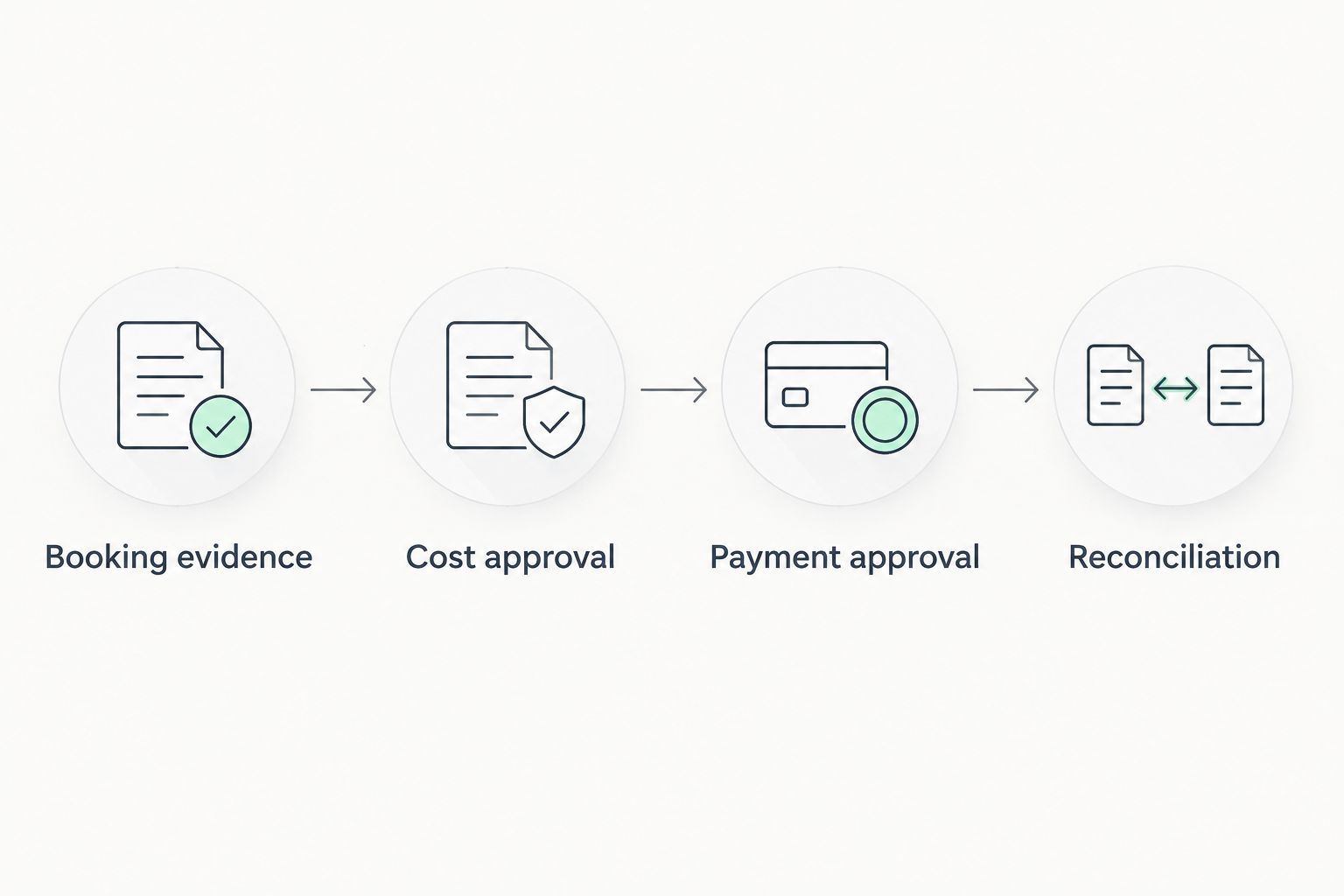
Use 2 approval checkpoints in this proposed workflow: one before committing the cost and another before releasing payment. Keep 3 references together where applicable: the booking reference, invoice reference and payment reference. Treat deposit and balance as 2 payment stages, not one undifferentiated booking receipt.
For USD or EUR receipts, decide when conversion is needed against your local supplier obligations. Holding a foreign-currency balance does not itself settle a rand-denominated invoice; confirm the conversion and payment steps available to your business.
The accounting integration guide provides a separate starting point for reviewing the handoff into your books. Check the actual fields and reconciliation process, not just whether an integration exists.
Which expense approval tool should you choose?
Choose Zeam for payment approvals connected to international receipts and supplier costs; choose a dedicated expense application for employee claims. If employee reporting is your main requirement, Zoho Expense is the default shortlist choice in this comparison.
For your 2026 decision, write down the transaction that currently causes trouble. A missing receipt points towards expense capture. An unauthorised supplier payment points towards payment controls. An overseas booking balance points towards receiving arrangements—not automatically an expense application.
Keep card acceptance and booking software in the evaluation. Receiving overseas payments, accepting cards and sending payment links are different collection workflows; confirm which methods suit your guests and which controls each provides. None of the recommendations here establishes that a business money platform replaces your booking system or card acceptance.
Start your business account application
Complete verification and confirm receiving routes, supplier payments and approval controls for your business.
FAQ
What's the best expense approval tool for an African finance team?
The best choice depends on whether you approve employee claims or outgoing business payments. Zoho Expense is the default employee-reporting shortlist choice here; use a payment-focused platform when supplier payment authorisation is the central requirement.
Is Zeam an employee expense management app?
Zeam includes team approvals within business money management, but its stated capabilities do not establish a dedicated employee receipt and reimbursement system. Assess it for international receiving, currency balances and supplier payment workflows, and verify the approval controls you need.
Can a South African tour operator receive USD and EUR booking payments?
USD and EUR receiving is among the stated platform capabilities, using receiving details in the business's name for payments from US and European clients. Confirm your business eligibility, complete verification and check the relevant receiving route before sharing instructions with guests.
Is approving an expense the same as approving a payment?
No. Expense approval confirms that a claim or cost is acceptable; payment approval authorises money to leave the business. Your process should identify who owns each decision.
Does an expense approval tool replace card payments or booking software?
No. Expense approval governs business spending, while card acceptance collects customer payments and booking software manages reservations. Confirm any claimed connection between those systems rather than assuming replacement.
How should a safari business handle booking deposits and supplier costs?
Track deposits and balance payments against the booking, then approve supplier commitments and outgoing payments separately. Keep the invoice and payment references connected so finance can reconcile the itinerary's costs and receipts.
What should finance teams check before choosing a tool in 2026?
Check business eligibility, approval roles, supporting evidence, accounting compatibility and any required reimbursement or payment route. Request a demonstration using your own booking, supplier invoice or employee expense scenario before committing.
One last thing
An approved expense can still be an unpaid expense. Make your records distinguish approval from settlement, and reconcile the completed payment before marking the obligation as paid. That distinction keeps a clean approval queue from disguising an outstanding supplier bill.