
Best for payment-side records: Zeam; best for a dedicated cloud ledger: Xero; best for accountant-led selection: QuickBooks Online. This 2026 guide compares accounting integration tools for African fintechs through a practical lens: South African tour operators collecting overseas booking payments and paying local suppliers.
- Zeam suits tourism businesses needing overseas payment records alongside USD and EUR digital balances.
- Shortlist Xero, QuickBooks Online or Odoo for accounting; verify connectors separately from payment functionality.
- Compare accounting integration tools for African fintechs using booking references, currency records and reconciliation controls.
- Keep card acceptance and payment links where they fit; receiving details serve a different collection workflow.
Why this matters
A booking deposit is not the same event as a supplier payment, a currency conversion or recognised revenue. Your accounting workflow needs to distinguish them, even when they relate to the same safari itinerary.
For a 2026 software decision, start with the booking lifecycle rather than a connector directory. A guest pays in USD or EUR, your business records the receipt, and local accommodation or transport suppliers need payment. Each event needs an identifiable record.
Choose the accounting destination and the payment collection method separately. A business money platform supports receiving and managing funds; accounting software records the financial treatment. Neither automatically replaces your booking system.
What makes the best accounting integration tools?
Use these criteria before comparing names. They address the difference between a connection that transfers data and a workflow your bookkeeper can reconcile.
- Booking traceability: You need to connect a deposit, balance payment and refund to the correct booking without relying on a guest's name alone.
- Currency detail: Keep the original payment currency separate from the accounting currency, including identifiable conversion records.
- Reconciliation controls: Check how the workflow handles unmatched receipts, duplicate imports, fees and corrections.
- Accounting fit: Your accountant needs suitable ledger records, supporting documents and a clear treatment of advance payments.
- Connection evidence: Verify the exact connector, transferred fields, direction of transfer and error handling before relying on automation.
- Operational fit: Separate collection, approval and supplier-payment responsibilities where your team requires them.
For your 2026 shortlist, ask for a demonstration using your own booking sequence. A generic dashboard demonstration does not establish that a deposit and a later balance payment reach the right accounting records.
Accounting options at a glance
These options serve different layers. The ranking follows a tourism business's payment-to-accounting workflow, not a claim that every entry offers the same functionality.
| Rank and option | Best for | Standout role | Key limitation |
|---|---|---|---|
| 1. Zeam | Overseas payment-side records | USD and EUR receiving details in the business's name, digital balances and payment records | Not a bank or a substitute for a general ledger; verify the specific accounting connection |
| 2. Xero | A dedicated cloud accounting ledger | Invoicing, accounting records and reconciliation workflows | A payment provider connection needs separate verification |
| 3. QuickBooks Online | Accountant-led software selection | Accounting and transaction categorisation within an established ledger | Edition and regional differences need checking |
| 4. Odoo | Operations-linked accounting | Accounting within a broader business application suite | Scope and implementation require careful definition |
| 5. Controlled CSV import | A reviewable import fallback | Explicit field mapping and approval before records enter the ledger | Manual preparation and duplicate controls remain your responsibility |
1. Zeam: best for overseas payment-side records
Zeam helps African businesses receive USD and EUR payments from US and European clients using receiving details in their business's name. It also supports multiple currency balances, conversion, local supplier payments, payment links, records, accounting integrations and team approvals.
For a South African safari operator, the relevant workflow starts with an overseas booking receipt and ends with usable records for accounting. This is a payment-management role, not a claim that a particular ledger connector transfers every field automatically.
Zeam pros:
- Receiving details are in the business's name.
- Multiple currency balances support holding funds and converting when needed.
- Payment records and team approvals sit alongside money-management functions.
Zeam cons:
- Digital balances are not bank deposits; the business is not a bank.
- International and bulk supplier payments sit on higher plans.
- The exact accounting integration and payment route need confirmation before implementation.
Best for: Tourism businesses that need overseas receipts and local supplier payments connected operationally to their bookkeeping process.
Verdict: Buy into the workflow only after account verification and confirmation of the required route and accounting connection.
2. Xero: best for a dedicated cloud accounting ledger
Xero is cloud accounting software with invoicing, accounting records and reconciliation functions. Its role in this shortlist is the ledger destination, not an alternative method for collecting every international booking payment.
Use Xero as a candidate when you want your accountant to maintain accounting records separately from the systems collecting money. Ask the accountant to demonstrate how a booking deposit, final balance and supplier payment will be recorded.
Xero pros:
- Provides a dedicated accounting environment.
- Supports invoicing and reconciliation workflows.
- Separates ledger decisions from the choice of payment collection method.
Xero cons:
- A suitable payment connection must be checked independently.
- Imported transactions still need correct references and accounting treatment.
- Product configuration and relevant regional requirements need review.
Best for: Tour operators choosing a standalone cloud ledger with their accountant.
Verdict: Buy if the ledger fits your accountant's requirements and the payment-data workflow passes a booking-level check.
3. QuickBooks Online: best for accountant-led selection
QuickBooks Online is cloud accounting software for maintaining business financial records. Consider it when your accountant proposes it as the destination for invoices, receipts and transaction categorisation.
The decision should follow a working demonstration, not familiarity with the name. Check the exact edition and regional offering, then establish how overseas receipts and local supplier costs enter the ledger.
QuickBooks Online pros:
- Provides an accounting destination separate from payment collection.
- Supports transaction categorisation and financial records.
- Gives your accountant a defined system in which to demonstrate the workflow.
QuickBooks Online cons:
- Features differ across editions and regional offerings.
- A named payment integration does not establish that every required field transfers.
- Reconciliation exceptions still need an owner.
Best for: Tourism businesses whose accountant recommends and supports this ledger.
Verdict: Buy when the accountant demonstrates the exact edition, currency workflow and reconciliation process you need.
4. Odoo: best for operations-linked accounting
Odoo combines accounting with a broader suite of business applications. It belongs on the shortlist when your decision includes operational records as well as bookkeeping.
For a tour operator, define which system owns the booking, invoice and supplier record before planning connections. Adding more applications without assigning ownership creates competing versions of the same transaction.
Odoo pros:
- Places accounting within a wider business application suite.
- Offers a route for considering operational and financial processes together.
- Encourages an explicit decision about which application owns each record.
Odoo cons:
- A broader implementation requires more process decisions.
- Booking-system and payment connections require individual verification.
- Configuration alone does not guarantee clean historical records.
Best for: Businesses deliberately planning a wider operations-and-accounting implementation.
Verdict: Hold until the implementation scope, record ownership and required connections are documented.
5. Controlled CSV import: best for a reviewable fallback
A controlled CSV import moves structured transaction data into accounting software that accepts the relevant import format. It is a workflow rather than a branded connector, and it depends on suitable export and import capabilities on both sides.
Use it as a fallback when you need an inspectable handover. Keep the original file, document the field mapping and record which transactions have already been imported.
Controlled CSV import pros:
- Makes field mapping visible for review.
- Allows approval before transactions enter the ledger.
- Provides a fallback where a suitable direct connection is unavailable.
Controlled CSV import cons:
- Preparation and checking require staff time.
- Repeated imports can create duplicates without controls.
- File formats and available fields must match the accounting requirements.
Best for: Businesses needing a controlled handover while assessing a direct integration.
Verdict: Hold as a fallback; skip uncontrolled spreadsheet copying without import logs and duplicate checks.
Check the workflow against a real booking
Use one completed itinerary to assess your 2026 shortlist. Include its deposit, balance payment and supplier costs rather than demonstrating only a straightforward receipt.
Booking reference
Assign 1 booking reference to the itinerary and retain it across invoices, payment instructions and accounting records. Keep the guest's name as supporting information, not the only matching field.
Overseas receipt
Retain at least 3 records per booking payment: the invoice or payment request, receipt evidence and allocation to the booking. For foreign-currency receipts, preserve 2 currency amounts wherever conversion occurs: the original amount and the converted amount.
Ledger match
Confirm how the receipt reaches the accounting system and who resolves an unmatched item. Ask your accountant how advance booking payments should be treated; do not automatically classify every deposit as earned revenue.
Supplier payment
Link local supplier payments to their invoices and the relevant itinerary. Where one supplier invoice covers several bookings, document the allocation rather than forcing a false one-to-one match.
Exception review
Check a partial payment, a refund and a repeated import. The workflow is ready only when someone can identify the exception, correct it and preserve the supporting record.
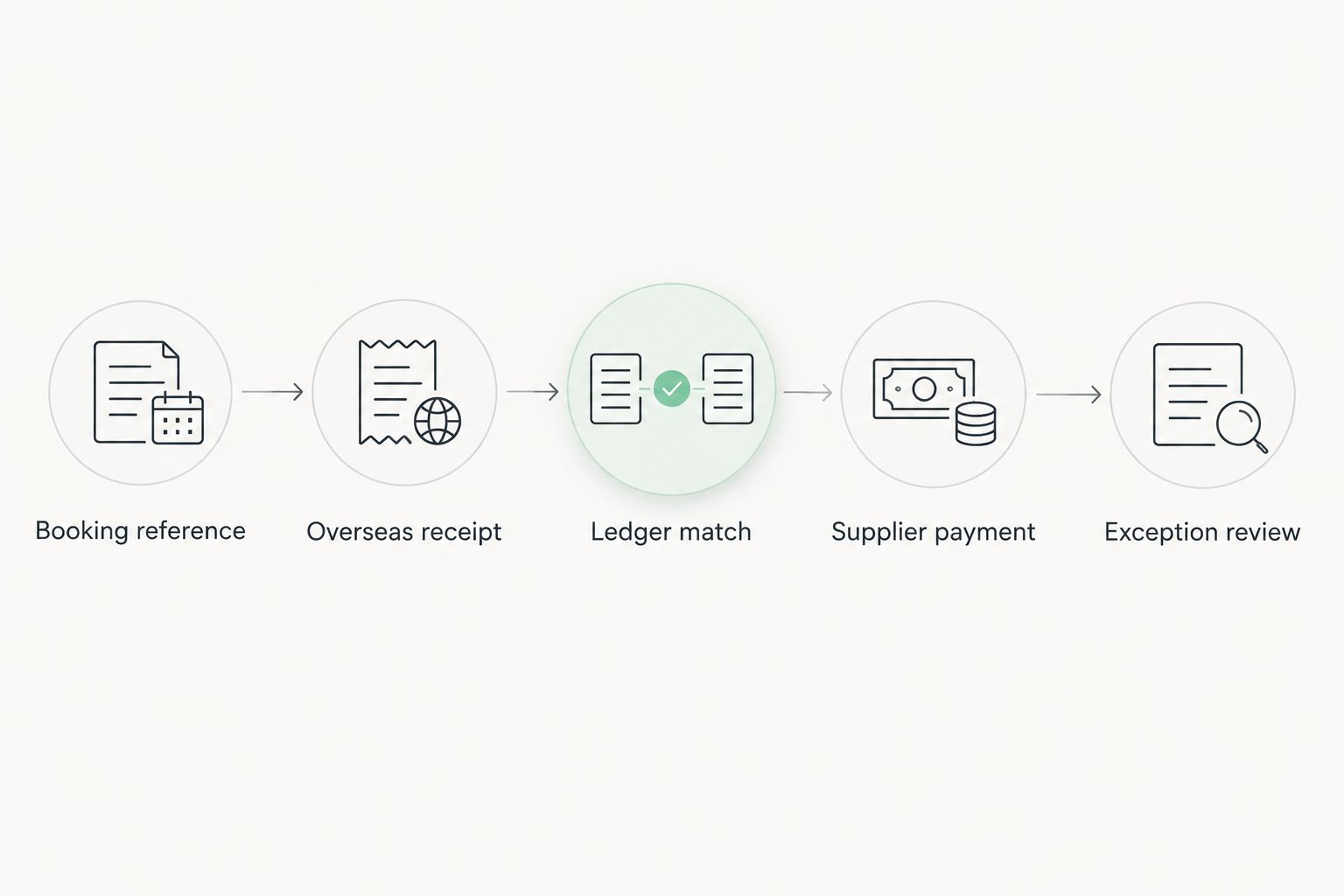
Record the result of each check in your implementation notes. A successful receipt is not enough: the accounting entry and the supplier allocation must also be explainable.
Keep receiving details, cards and payment links distinct
Your 2026 collection setup can include more than one payment method. Choose the method for the booking situation, then confirm how its records reach accounting.
| Collection option | Best for | Advantage | Limitation to check |
|---|---|---|---|
| Overseas receiving details | Guests or overseas partners paying against an invoice | Gives the payer business receiving details | Confirm currency, route, reference handling and approval requirements |
| Card acceptance | Bookings where the guest chooses to pay by card | Supports a card-payment checkout | Check settlement records, dispute handling and accounting connection |
| Payment links | Sending a payment request outside a booking checkout | Places a payment request in a shareable link | Confirm underlying payment methods and booking-reference capture |
Do not remove card acceptance or your booking system just because overseas receiving details are available. Likewise, a payment link does not establish which payment methods, currencies or accounting fields it supports.
Choose the collection method for the guest and the reconciliation method for your business. Both decisions need to work together.
Apply, verify and confirm the connection
If the payment-side workflow fits, apply for a business account and complete verification before relying on it for guest collections. Confirm the required receiving currency and payment route, the accounting connection and any relevant plan limitations.
Prepare your booking-reference convention and accountant's field requirements before implementation. Do not promise a guest a collection route or transfer time that has not been confirmed for your account.
Assess your booking-payment workflow
Review business account information, then apply and complete verification before collecting booking payments.
How the options were ranked
The ranking prioritises payment traceability, currency records, reconciliation, accounting fit and operational responsibility. Each recommendation owns a different role; it is not a performance benchmark or a claim that every listed system connects directly to every other one.
Which option should you choose?
Zeam is best for tourism businesses that need overseas payment records alongside USD and EUR digital balances. Pair that payment-side decision with an accountant-approved ledger rather than treating it as a replacement for accounting software.
For your 2026 decision, shortlist Xero for dedicated cloud accounting, QuickBooks Online when your accountant supports that choice, and Odoo when the project includes wider operations. Keep controlled CSV import as a documented fallback, not an excuse to abandon reconciliation.
FAQ
What's the best accounting integration tool for a South African tour operator?
The best choice depends on whether you need payment records, an accounting ledger or a connection between them. Choose the ledger with your accountant, then verify how overseas receipts, conversions and supplier payments reach it.
Does an accounting integration replace my booking system?
No, an accounting integration does not by itself replace your booking system. Keep itinerary details, guest records and booking administration in the system responsible for them, with references connecting them to accounting.
Can I receive a booking deposit in USD or EUR?
USD and EUR receiving functionality is available through the business payment offering described here, subject to verification and confirmation of the required route. Confirm the details for your account before sending payment instructions to a guest.
Should I stop accepting cards if I use overseas receiving details?
No, overseas receiving details are not a reason on their own to stop accepting cards. Keep the collection methods that fit your guests and check how each method produces records for reconciliation.
Are digital balances the same as bank deposits?
No, the digital balances described here are not bank deposits. Treat the provider's status and balance terms as a separate decision from its usefulness for collecting and managing business payments.
How do I prevent duplicate accounting imports?
Keep an import log and check transaction identifiers before repeating an import. Assign responsibility for reviewing duplicates and retain the original source records.
What should I check before choosing an accounting connector?
Check the exact systems connected, fields transferred, transfer direction and exception process. Demonstrate a deposit, balance payment, conversion and refund before depending on the connection for live bookings.
One last thing
An unmatched booking deposit deserves attention even when the total balance looks correct. Before approving your setup, ask your bookkeeper to trace a receipt from the original payment request through the ledger to the itinerary. A matching total is not proof that the correct booking has been paid.