
Best overall for dedicated invoicing: Zoho Invoice. Best for accounting-led invoicing: Xero. Best for manual control: a spreadsheet invoice template. This 2026 guide compares invoicing tools for African freelancers paid in USD, with practical booking-payment examples for independent guides and South African tourism businesses.
- Zoho Invoice leads this shortlist of invoicing tools for African freelancers paid in USD for dedicated invoice creation.
- Xero suits businesses that want invoicing connected to their accounting records.
- A spreadsheet template suits manual invoicing, but requires you to track every payment yourself.
- Zeam complements invoicing tools with USD and EUR receiving details, subject to verification and route approval.
Why this matters
An invoice requests payment; a receiving account provides somewhere for the money to arrive. Choosing one does not automatically solve the other. A USD invoice also does not guarantee that your client can use their preferred payment method.
For a freelance guide invoicing an overseas operator, the practical question is whether the payer can send the invoiced currency through an approved route. For a safari business, it also means matching booking deposits and balance payments to local supplier commitments.
Zeam provides USD and EUR receiving details in a business’s name, multiple currency balances and local supplier payments. Treat those capabilities as a companion to invoicing, not evidence of a booking system or invoice-generation feature.
What makes the best USD invoicing tool?
Use these criteria for your 2026 shortlist. Evaluate the invoice workflow separately from the payment route.
- Currency clarity: Your invoice must identify USD explicitly, rather than rely on an ambiguous dollar symbol.
- Payment instructions: The invoice must explain how to pay through a route approved for your business.
- Booking references: Deposits, balance invoices and incoming payments need a shared reference.
- Record quality: You need to distinguish an issued invoice, an overdue invoice and a received payment.
- Accounting fit: Choose dedicated invoicing or accounting-led invoicing according to who maintains your books.
- Business approval: Confirm eligibility, verification requirements and applicable payment routes before sending instructions to clients.
USD invoicing options at a glance
The first three options create invoices. The fourth handles receiving and business-money management alongside a separate invoicing process; it is included because collecting the payment is a different decision from creating the bill.
| Option | Best for | Standout capability | Key limitation |
|---|---|---|---|
| Zoho Invoice | Dedicated invoice management | Invoice creation and payment tracking | Payment collection requires a separately suitable route |
| Xero | Accounting-led invoicing | Invoices connected to accounting records | Confirm multicurrency features for the selected plan and market |
| Spreadsheet invoice template | Manual control | Editable invoice layout and payment schedule | Payment tracking and reconciliation remain manual |
| Zeam | Receiving and managing overseas business payments | USD and EUR receiving details in the business’s name | Not established here as an invoice-generation or booking tool |
1. Zoho Invoice: best invoicing tool for dedicated billing
Zoho Invoice is invoicing software for creating invoices and tracking their payment status. It fits a freelancer who wants a dedicated billing workflow rather than making each invoice from a document or spreadsheet.
For a tourism-services business, the useful distinction is between requesting a booking deposit and recording its receipt. Keep the invoice reference visible in your payment instructions, then check the incoming transaction before marking the invoice paid.
Zoho Invoice pros
- Keeps invoice creation in a dedicated invoicing application.
- Supports a structured record of invoices and their payment status.
- Separates client billing from the broader decision about accounting software.
- Provides an alternative to maintaining invoice documents manually.
Zoho Invoice cons
- An invoice does not itself establish an approved USD receiving route.
- Payment integrations require separate checks for business eligibility and regional support.
- An invoicing workflow does not replace a tourism booking system.
Best for: Freelancers and small service businesses that want dedicated invoice management.
Before committing, create an example USD invoice and inspect the currency, reference, due date and payment instructions. Check that your overseas client can use the receiving method you intend to provide; do not infer compatibility from an integration logo.
Verdict: Buy for dedicated invoicing; approve the payment route separately.
2. Xero: best invoicing tool for accounting-led businesses
Xero connects sales invoicing with accounting records. It suits a business that wants its bookkeeper or accountant working from the same financial system as the person issuing invoices.
For a safari operator, that connection matters when overseas receipts fund accommodation, transport and other supplier commitments. Your accountant still needs to determine how foreign-currency transactions and any exchange differences belong in the books.
Xero pros
- Connects invoice activity with the accounting ledger.
- Gives billing and bookkeeping a shared financial record.
- Supports an accounting-led approach to reconciliation.
- Suits businesses choosing invoicing as part of a wider finance system.
Xero cons
- Multicurrency functionality depends on the selected plan and market.
- Accounting setup requires more decisions than a standalone invoice template.
- Invoicing capability does not guarantee access to a particular payment route.
Best for: Tourism businesses and freelancers whose accountant already uses, or recommends, Xero.
For a 2026 software decision, ask your accountant to review the actual plan before migration. Confirm that it handles your invoicing currency and reporting needs, rather than assuming every version has identical functionality.
Verdict: Buy when accounting integration is the deciding requirement; hold until multicurrency suitability is confirmed.
3. Spreadsheet templates: best for manual invoice control
A spreadsheet invoice template lets you write the invoice, calculate line items and maintain your own payment register. It is a practical option when you are prepared to handle the administrative work yourself.
For an independent guide billing an overseas tour operator, a template can clearly identify the service, booking reference and amount requested. The limitation is operational: the spreadsheet does not independently confirm that money has arrived.
Spreadsheet template pros
- Gives you direct control over invoice wording and layout.
- Lets you separate deposit and balance requests clearly.
- Allows booking references and supplier notes in your own register.
- Keeps the invoicing process independent of a particular software provider.
Spreadsheet template cons
- You must update payment status manually.
- Formula errors and duplicate versions require active checking.
- Reconciliation depends on comparing the register with actual transaction records.
Best for: Freelancers comfortable maintaining a manual invoice register and checking each receipt.
Use one master template, retain issued copies and keep a separate payment register. Never overwrite an issued invoice merely to make the outstanding balance look correct; preserve the original request and record what happened afterwards.
Verdict: Buy into this workflow only if you will maintain it consistently; skip it when manual follow-up already causes confusion.
4. Zeam: best companion for overseas payment receiving
Zeam is best for businesses that need USD and EUR receiving details alongside a separate invoicing tool. Businesses can hold multiple currency balances, convert when needed and pay suppliers locally, subject to applicable approval and route requirements.
This is a receiving-and-money-management recommendation, not a claim that the service generates invoices. Its digital balances are not bank deposits, and the business is not a bank.
Zeam pros
- Provides USD and EUR receiving details in the business’s name for payments from US and European clients.
- Supports holding multiple currency balances and converting when needed.
- Includes local supplier payments and payment-link management.
- Supports records, accounting integrations and team approvals.
Zeam cons
- Invoice-generation and booking-system functionality are not established by the supplied product information.
- Account verification and applicable payment-route approval remain necessary.
- International and bulk payments are on higher plans; do not assume every account includes them.
Best for: Businesses choosing a receiving companion for overseas invoices and local supplier payments.
Apply for a business account and complete verification before adding receiving instructions to client invoices. Confirm that your business and intended payment route are approved, including where you operate; “African businesses” is not a country-by-country eligibility guarantee.
Verdict: Hold until verification and route checks are complete; then use it alongside your invoicing workflow.
Review your business account options
Check receiving capabilities, then apply and complete verification before sharing payment instructions.
A booking-payment workflow for South African operators
Use this sequence for your 2026 booking-payment process. It applies whether you issue invoices through dedicated software, an accounting platform or a manual template.
Booking terms
Agree the invoice currency, service description, cancellation terms and payment responsibilities before requesting money. For a staged booking, define 2 payment stages: the deposit and the balance. Set their due dates according to your actual booking terms and supplier commitments, not a generic industry timetable.
Invoice reference
Use 1 booking reference across the deposit request, balance request and payment instructions. Distinguish the individual invoices while keeping the booking traceable. Ask the payer to include the reference wherever the approved route permits it.
Receipt check
Check the transaction record before treating an invoice as paid. A guest’s payment screenshot is not the same as a confirmed receipt in your business records. If the received amount differs from the request, resolve the difference rather than silently closing the invoice.
Supplier payment
Identify the local-currency commitments attached to the booking before converting or spending the receipt. Keep 3 linked records: the invoice, the incoming payment and the supplier payment. Those records explain how the booking moved from a sales request to money received and costs paid.
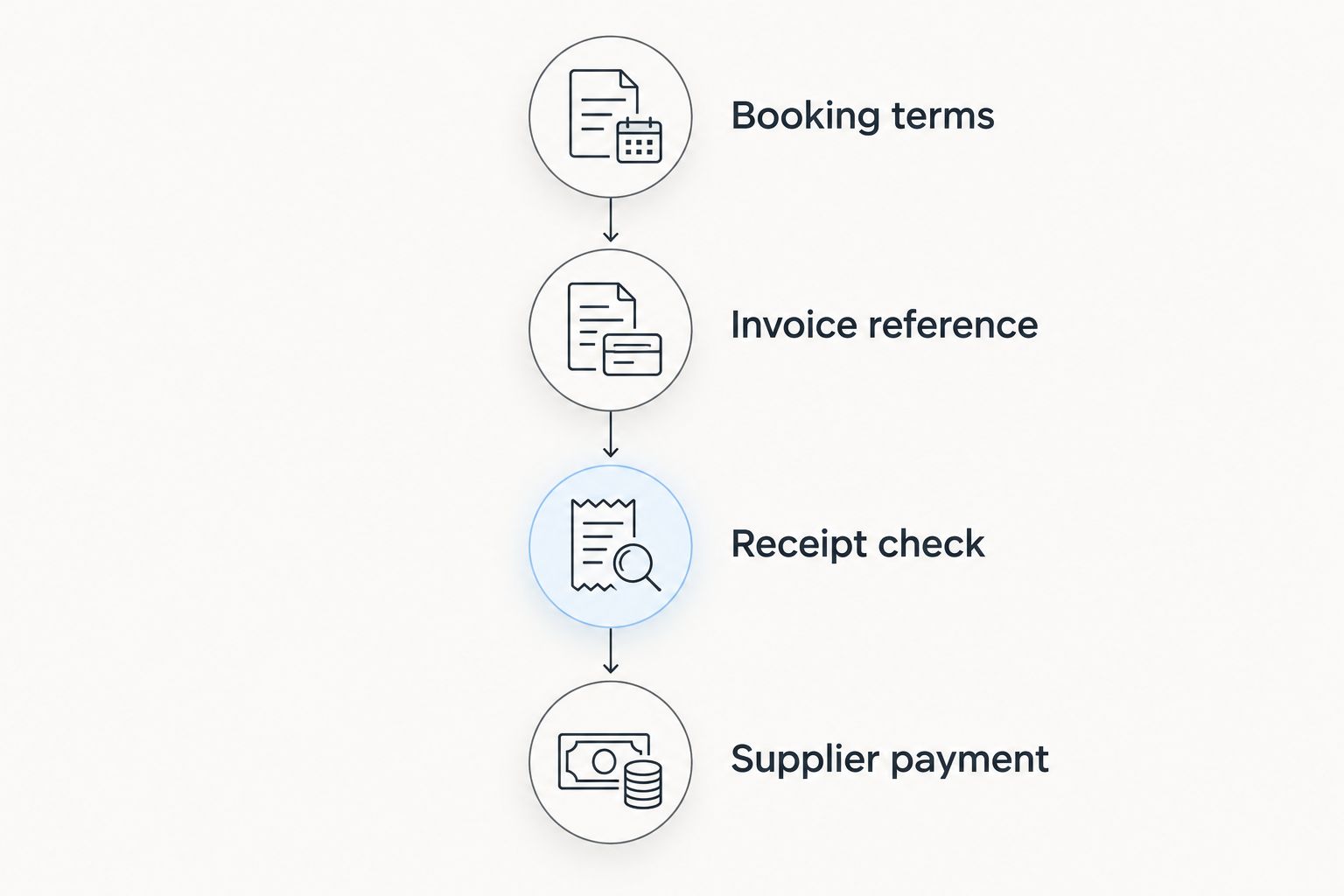
Do not describe that sequence as a guaranteed transfer timetable. The payer’s method, the approved route and transaction checks remain separate from the due date printed on your invoice.
Receiving details, card payments or payment links?
Choose the payment method around the payer and the booking, not the invoice software’s headline features. These options serve different purposes and are not interchangeable.
| Method | Best for | Advantage | Limitation |
|---|---|---|---|
| Business receiving details | A client paying through an approved transfer route | Connects a transfer to named business receiving details | Requires route suitability and clear reconciliation instructions |
| Card acceptance | A guest who wants to pay by card | Provides a card-payment checkout | Requires an approved card-payment arrangement and its applicable terms |
| Payment link | Sending a payer to a payment page | Makes payment instructions easy to share | The link alone does not establish which currencies or payment methods are supported |
A European operator settling a business invoice and an individual guest paying a safari deposit do not necessarily need the same checkout. Confirm each method’s supported currency, refund process and payment status reporting. Do not assume a payment link accepts cards, or that receiving details replace card acceptance.
How the options are ranked
This 2026 ranking follows the jobs in the criteria: dedicated billing first, accounting-led invoicing second, manual control third and payment receiving as a separate companion. It is a use-case shortlist, not a performance test or a country-eligibility ranking.
Choose Zoho Invoice by default for dedicated invoicing. Choose Xero when accounting fit decides the purchase. Keep a spreadsheet only when you accept the manual workload, and approve your receiving arrangement independently of all three.
FAQ
What are the best invoicing tools for African freelancers paid in USD?
Zoho Invoice is the default choice in this shortlist for dedicated invoicing, while Xero suits accounting-led businesses. A spreadsheet template suits manual control; all three still need a suitable payment-receiving arrangement.
Can a South African tour operator invoice overseas clients in USD?
A USD invoice requests payment in USD, but it does not establish an approved receiving route. Confirm the business’s payment arrangement and ask its accountant about the applicable invoicing and tax treatment.
Does sending a USD invoice mean I will receive USD?
No. The payment method and receiving arrangement determine how the payment is processed, so confirm the currency and route before sending instructions.
Should I use receiving details instead of card payments for safari deposits?
Use receiving details when the payer can use the approved transfer route; retain card acceptance where guests need it. Receiving details are not a verified replacement for a card checkout or booking system.
Is a payment link the same as an invoice?
No. An invoice records a request for payment, while a payment link directs the payer to a payment page. Check the link’s supported methods and currencies separately.
When should I share receiving instructions with an overseas client?
Share receiving instructions after business verification and approval of the intended payment route. Check that the details and invoice reference are correct before the client sends money.
Are digital balances the same as bank deposits?
No. Digital balances are not bank deposits. Understand the provider’s terms and the nature of the balance before choosing how to hold business money.
One last thing
An invoice marked paid and a booking ready to fund are different decisions. Before confirming your next 2026 departure, match the actual receipt to the booking, account for any unresolved difference and check the local supplier commitments. Invoice software organises the request; that final check protects the operating plan.